Give PowerBI an inventory history your team can support

What changed: A production release and a documented operating handover.

The business dependency behind the report

A consumer-products organization needed a dependable inventory-history source for an existing PowerBI report after a previous reporting dependency was retired. Current inventory balances alone could not provide a history of prior fiscal month-end positions. The agreed proposal called for a JD Edwards snapshot table, a scheduled population process, retention of historical records, documentation and deployment support. The practical concern was continuity: preserve the information the report needed without creating another undocumented process that only one person could explain.

Connect the reporting requirement to application work

Allari created a custom snapshot table and JDE batch process to read inventory data, derive reporting fields and store a dated inventory position. The technical guide connected the fiscal calendar, inventory sources, scheduled job and PowerBI refresh. The solution was subsequently released to production.

Make the calendar rule explicit

The scheduled process is configured to run weekly, but its fiscal validation determines whether it should create a month-end snapshot. With validation enabled, a scheduled run outside the defined fiscal month-end should not insert new snapshot records. This distinction matters to the support team: a completed job with no new rows may reflect the intended calendar rule. The documentation also describes a latest-snapshot indicator and configurable historical retention. Business timing, stored history and report refresh are treated as connected responsibilities.

Carry the change into production around the operating window

Allari built and deployed the development and test packages, then coordinated production deployment with another specialist to meet the after-hours window. The package was deployed across development, test and production, with the handoff and completion kept in the same work record.

Move knowledge into the operating handover

The operations guide connected scheduler completion, batch output, snapshot creation, the latest-snapshot indicator, retention and PowerBI refresh. It also called for reconciling key inventory totals between JDE and the report. Functional support, development, CNC administration, PowerBI administration and change coordination had defined responsibilities in a common operating procedure.

Bring the customer into review and validation

The Client Solutions Manager reviewed the developer’s documentation, requested additions and presented the plan and guide to customer stakeholders. The documents were shared with the customer, and later feedback returned to the developer for corrections and another trial. Customer review stayed connected to technical delivery.

The guide assigns functional support responsibility for business-result validation and approval of reruns where required. Recovery instructions call for confirming the business cycle and processing options before manual execution; bypassing fiscal validation requires approval and documentation. These controls preserve human judgment where reporting correctness depends on business context.

Test the rules, then retain the change history

Allari tested the solution locally and checked retention purging. A bug fix addressed fiscal month-end validation for a job scheduled every Saturday. Scheduler reviews and a maintained change log linked the operating routine to its delivery history and subsequent changes, giving support personnel context they could use after deployment.

Inventory history with an operating handover

Allari delivered the reporting table, snapshot solution, production package deployment, scheduled processing and an operating handover. The guide connected validation, recovery and responsibilities across functional support, development, CNC and PowerBI administration. The customer’s team had a process it could understand and support after the release.

Bring the actual workflow to the discussion

If your report depends on repeated extracts, spreadsheet reconstruction or specialist intervention, start by mapping the source data, business calendar, approval points and recovery steps with your team. Confirm the acceptance checks and budget before changing the process. Allari can bring the relevant application, reporting and operational expertise together under a dedicated Client Solutions Manager at no additional charge. The aim is a process your people can understand, validate and operate—and fewer occasions when someone has to reconstruct how it works.

Review the reporting process your team has to keep rescuing.

Bring the report, its source data and the operating work behind it. Together, define the calendar rules, validation, recovery steps and ownership needed to keep it supportable.
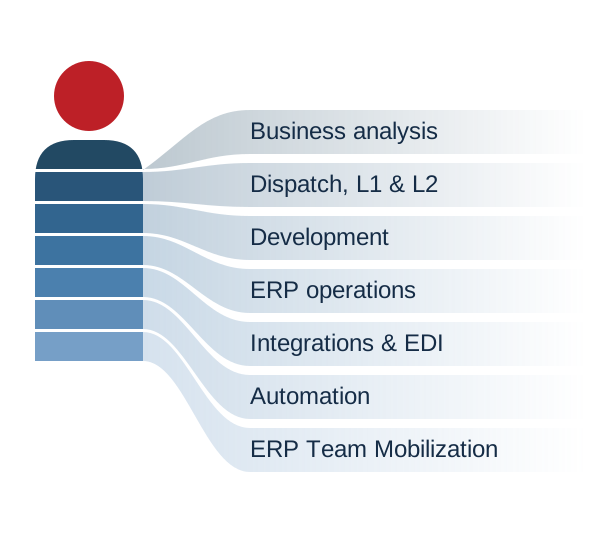
Coordinated expertise across business analysis, support, development, ERP operations, integrations, automation and ERP team mobilization.

Allari at Work

Your IT team.
Backed by an entire delivery organization.

Functional and technical specialists, coordinated around your priorities.

Discuss your next priority →